IT security is not just about theory; it is about practice. Explore these real-life scenarios to understand how everyday mistakes happen and how the principles from The Book on IT Security can prevent them.
The Scenario: An employee at a small accounting firm received an email that appeared to be an urgent invoice from a known vendor. Without verifying the sender’s actual email address, the employee downloaded and opened the attached “.pdf.exe” file. Within minutes, a ransomware payload encrypted the company’s central domain server, halting all business operations.
The Mistake: The employee fell victim to a social engineering and phishing attack due to a lack of security awareness training. Furthermore, the company’s backups were stored on the same network and were also encrypted by the ransomware.
The Solution (Book Chapter 2 & 10): If the company had implemented the 3-2-1 backup strategy (keeping one copy off-site or in an isolated cloud), they could have wiped their servers and restored their data without paying the ransom. This case highlights why a company’s most valuable treasure chest is its server, and why continuous anti-phishing education is mandatory.
The Scenario: A family purchased a set of cheap, unbranded smart security cameras to monitor their home while on vacation. They connected the cameras to their primary home Wi-Fi network but never changed the factory-default administrator passwords. A month later, they discovered their camera feeds were streaming on a public website.
The Mistake: The users ignored two critical IoT security rules: they left the default credentials unchanged, and they placed vulnerable smart devices on the same network they use for online banking and personal communication.
The Solution (Book Chapter 5 & 8): The first step when installing any new hardware is to immediately change the default administrator and user passwords. Additionally, all smart home (IoT) devices should be segmented onto a separate “Guest” Wi-Fi network. This limits an attacker’s ability to move laterally into sensitive devices like personal laptops or mobile phones.
The Scenario: A professional frequently posted high-resolution photos of their workspace and travel boarding passes on social media. They also had their full birthdate and phone number visible on their public profile. An attacker used this information to impersonate them, calling their mobile provider to transfer their phone number to a new SIM card (SIM swapping), eventually gaining access to their two-factor authentication (2FA) SMS codes and draining their bank account.
The Mistake: The user treated their public digital footprint carelessly. They allowed highly sensitive personal data to be publicly accessible, enabling attackers to easily bypass standard security questions.
The Solution (Book Chapter 3 & 9): Users must rigorously review their privacy settings on social networks. Sensitive data (birthdates, phone numbers, real-time location tags) must be hidden or removed. This case proves that identity protection goes far beyond just using a strong password—it requires constant vigilance over your digital footprint.

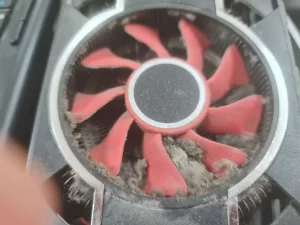
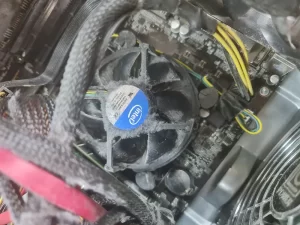
The Scenario: A user neglected to physically clean the inside of their desktop computer for an extended period. The computer, which was critical for their daily operations, began running loudly before shutting down completely. Upon inspection, a severe buildup of dust had caused both the graphics card and the processor to critically overheat and permanently fail. The repair and component replacement took a full day, during which this highly important workstation was entirely out of commission. To make matters worse, the burned-out processor was an older version that could not be immediately purchased in local stores, severely complicating the recovery process and extending the downtime.
The Mistake: The user ignored basic physical hardware maintenance. As the inspection revealed, a thick blanket of dust completely clogged the red graphics card fan and the Intel CPU cooler. This prevented the cooling systems from functioning, trapping the heat and literally frying the computer’s most vital components.
The Solution (Book Chapter 5): Hardware requires your attention too. Regular physical inspection and maintenance of computer systems are essential to prevent overheating and mechanical failure. Hardware malfunctions not only cause costly physical damage but also result in severe operational downtime and the risk of permanent data loss. Keeping the operating environment clean and monitoring hardware health is a critical, yet often overlooked, aspect of overall IT security and business continuity.